
Super-autonomous local video conference via OpenWRT + eduMEET + Raspberry Pi
Table of contents
Introduction
The results of the load test of the open source video conferencing platform eduMEET showed that a server with one CPU core and one gigabyte of RAM can already supply more than 20 participants in a video conference with audio and video without any problems and in high quality. There is also an article on heise.de, which shows that an SoC board with several antennas is capable of being a modern Wi-Fi router. Since modern SoC boards exceed the minimum requirements for an eduMEET instance by several orders of magnitude, the following question was obvious:
Such a device can be used for a variety of applications. Whenever a necessary factor or resource that is required for the service to function fails or is impaired, a local or Internet-independent solution can provide a remedy. Examples of this include
- Lack of Internet (network outages or even catastrophic failure, poor infrastructure connection, security relevance)
- Necessity for spatial separation of communication partners (medical context, separate routing in-house)
- Ad-hoc screen sharing without sound and necessary power source
Requirements and scope
In order to be able to answer the first part of the research question with a "yes", all of the following sub-goals must have been achieved:
- There is a device that has these characteristics:
- it is an SoC board with a Wi-Fi chip that can also be operated in access point mode
- the SoC board is compatible with OpenWRT
- The eduMEET container is functional on the device
- There is connectivity between all parties (server & client)
- Client A receives audio and video from client B
For the second part of the question, various aspects of a normal video conference must be tested, including latency, image and sound quality, but also range and any problems that may occur.
What was not the subject of this project, however, is the question of scalability or load evaluation, comparison of several video conferencing systems with a similar setup and comparison of different hardware setups. These are questions that can be located in the Future Work area.
System structure
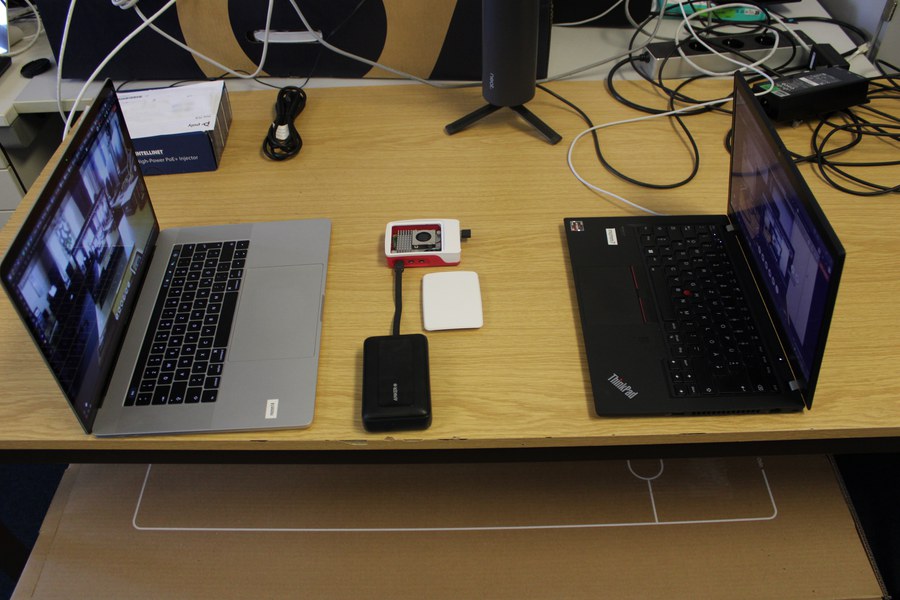
The picture below outlines the (hardware) structure of the setup: in red and white the (headless) Raspberry Pi 5, which is supplied with power via a mobile 20,000 mAh power bank, on the left a Macbook as client A and on the right a Lenovo ThinkPad as client B.
The schematic structure on the Raspberry Pi 5 itself looks as follows:
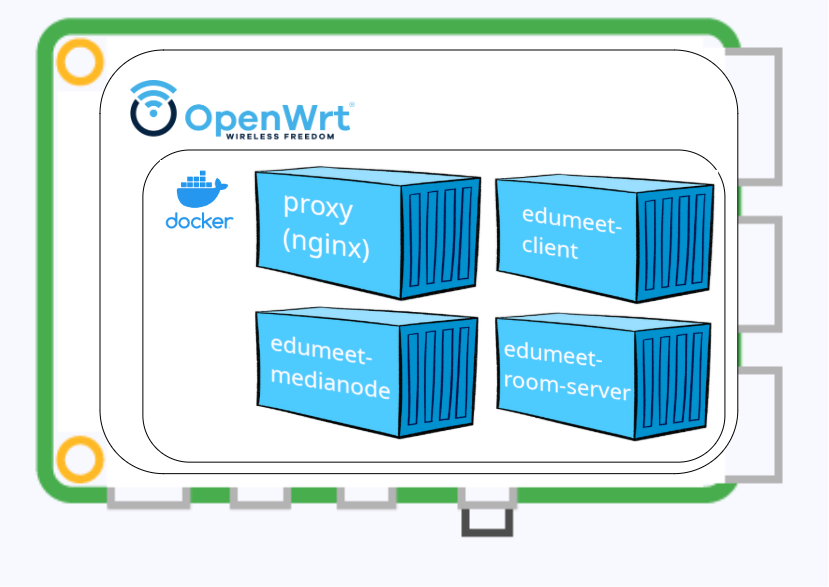
The Raspi runs OpenWRT as the operating system(snapshot version [build r30879-18077d22e9]), which in turn runs the Docker daemon to administer the containers. Four containers are necessary for the service: a proxy container, which correctly forwards the request from the network (and thus the clients); a client container, which takes care of the display of the UI and the client-side configuration of the service; a medianode container, responsible for the audio and video signal "processing" and a roomserver container, which organizes the backend of the service. The version of eduMEET is 4.2-20260109-arm.
Implementation and procedure
The original plan was to use a discarded Intel NUC as a server, but this would have required both a special power supply unit and a USB antenna. During the research it quickly became clear that there are almost no USB antennas that support the necessary access point mode to be able to function as such for clients. A Raspberry Pi 5 was therefore chosen as the platform, which solves both the power and connectivity problems.
By changing the platform (x86→ARM), however, extra Docker builds had to be created for ARM, as some images contained packages that did not run properly on ARM-based systems.
Due to the actual target platform (router), the root partition is only created slightly over 100 megabytes in size by default during installation. However, as additional packages have to be installed from the repository at the same time, it is necessary to enlarge the partition. Unfortunately, there is a bug that creates the offset of the reserved blocks incorrectly, which means that resizing does not work (see Github Issue). After the treatment with the linked command, the size of the partition can be adjusted correctly. However, this changes the UUID, which is why the boot process failed → replace UUID with /dev/mmcblk0p2 and this problem is also solved.
After some packages have been installed (dockerd, curl, docker-compose, git-http, git, jq, ack, bash), local certificates or the fullchain must be created for WebRTC and eduMEET, as the built-in certbot variant (via Letsencrypt) cannot be used.
The initial installation of eduMEET is carried out via run-first.sh script. When building the containers from the images, make sure that the TAG parameter in the .env file is set to the corresponding ARM Docker repository, otherwise the x86 variant will be used by default.
The configuration of eduMEET on OpenWRT essentially comprises the adaptation of three files (path depending on the selected installation, here /opt/edumeet/):
- /opt/edumeet/proxy/nginx.conf.template
- /opt/edumeet/.env
- /opt/edumeet/docker-compose.yml
In nginx.conf the path to the self-signed certificates, in the .env file - as already mentioned - the TAG and in docker-compose.yml the path to the volumes of the certificates in the proxy service must be adjusted. Furthermore, the certbot service should be completely removed as it is not required.
Once the configuration of the service has been completed, OpenWRT must be switched from "DHCP client" to "DHCP host" mode using uci commands so that mobile devices can connect to the local Wi-Fi and also receive an IP address via DHCP.
For reasons of simplicity, it was decided not to implement complex firewall rules that would have increased the security of the system. This was simply not necessary due to the framework conditions and was therefore configured so that all packets from all directions were always accepted or forwarded and never discarded.
A note: the Docker daemon and the LuCi web interface for configuring OpenWRT, which accept client requests on port 80 and 443 respectively, cannot run in parallel in the standard configuration because only one of the two services can bind the port to itself. Either you change the ports for the respective service or you switch back and forth between them.
If you know what needs to be done, the installation and configuration of the system takes one to two hours at most.
Results & experience
We were able to correctly configure OpenWRT on the Raspberry Pi 5 as well as install an eduMEET instance so that clients can confer via the server.
Tests showed that three mobile clients (two Lenovo laptops, one Apple Macbook Pro) were able to hold a high-quality video conference without any restrictions or were in fact indistinguishable from "normal instances". Both the video quality and the audio quality in terms of latency and resolution were excellent.
The power consumption of the Raspberry Pi during use was around 3 watts, which with a 25,000 mAh power bank (in our case an Anker 165W) means an operating time of around one day or 24 hours.
Discussion
With the results from the previous chapter, the research question posed at the beginning can be answered with a clear "yes".
The limitations of this setup lie first of all in the installed components: With direct visual contact, the video conference is not or not perceptibly impaired up to a distance of 65 meters. Up to 90 meters, the return direction, i.e. from laptop to RPi, is impaired. This means that the laptop was not able to provide the transmission power to supply the server with audio and video, which resulted in the laptop still receiving data from the other participants, but no longer from the laptop. After 90 meters, both the outward and return directions were interrupted and it was no longer possible to send and receive data.
However, this distance decreases dramatically as soon as there are obstacles in the way. Short distances through a few walls are still possible, but from a distance of 10-15 meters through solid walls, connectivity is so limited that meaningful data exchange is no longer guaranteed.
The firewall configuration is certainly sufficient for this proof-of-concept project, but the correct firewall rules should be used for productive use.
Outlook & future work
An interesting aspect that could be investigated at another time would be the question of the scalability of the system in terms of bandwidth. How many participants can join a conference before there are restrictions or impairments to the service? Does eduMEET automatically reduce the quality and data rate via the SFU when it recognizes that the bandwidth is no longer large enough? From the load test mentioned above, we already know the limit in terms of CPU and RAM but not in terms of Wi-Fi connectivity. A structured load test under realistic conditions would clarify this.
From a technical point of view,optimization possibilities can easily be found in the components: an external antenna would increase the transmission and reception power so as not to have to use the moderately dimensioned built-in antenna of the Raspberry Pi 5. Switching to another platform outside the Raspberry Pi ecosystem probably offers the greatest optimization potential, although it must be remembered that the number of compatible components is quite small (see access point problem). A device for aligning the signals (similar to a directional radio antenna) could also increase the range, even if only in the server→client direction.
Conclusion
The setup is promising from the VCC's point of view. For various "on-site inspections" - as they often occur in the VCC - the purpose can be extended even further, for example to hold a video conference at a location that is not intended for it with little effort and equipment or to test equipment on site that has apparently given up the ghost.
Having the ability to transmit mobile audio and video with very few resources can only lead to more use cases in the future, which will only become apparent over time.
Scenarios can also be created to provide a quick workaround in the event of a service failure. Having a pre-configured Raspberry Pi in stock at low cost, which can be connected to the power and data network in a few minutes to create a video conferencing option for a few hundred participants, can absorb an unforeseen peak load or be part of a backup strategy.
In order to support other research groups with subsequent use, we provide the configuration files in the following sections