
SphereCoder360
As part of qualitative and quantitative classroom research in complex data collection settings, the Chair of General Didactics and Instructional Research focuses on the empirical study of teaching and professional development processes. For working with spherical video footage (180–360°), SphereCoder 360 is now available—a specialized software tool for systematic video analysis and behavioral coding designed specifically for the analysis of 360° and VR videos.
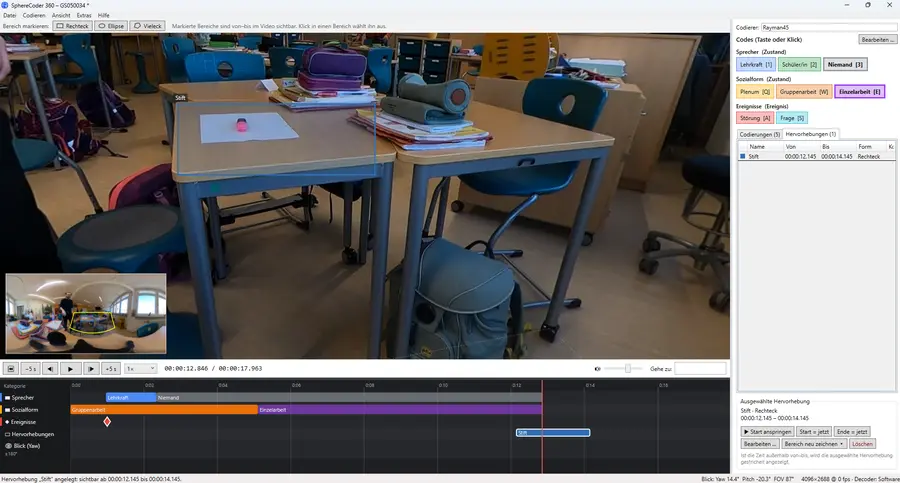
SphereCoder
While existing video coding programs are designed for conventional, flat image sections, SphereCoder 360 is currently the first analysis tool of its kind to systematically combine time-based category coding with the spatial dimension of spherical video recordings within a single work environment.
Overview of Features
-
Video playback and navigation in 360° space: In addition to classic two-dimensional videos and 180° recordings (VR180), the software specifically processes equirectangular 360° videos as well as 3D stereo formats (top/bottom and side-by-side). In addition, .360 raw files from a GoPro MAX can be opened directly and stitched together within the program to create a panoramic view. Within the 360° space, the view can be panned, tilted, and zoomed using the mouse or keyboard, with the field of view adjustable between 20° and 120°. An overlayable overview map displays the entire panorama as well as the currently selected viewing area.
-
Creating and Managing Categorization Systems: For the coding process, users can create and edit their own categorization systems, as well as import and export them across projects. The program methodically distinguishes between mutually exclusive states (such as social forms or speaker changes) and isolated events (such as questions or interruptions). Individual shortcut keys and color codes can be assigned to each category.
-
Combination of temporal and spatial coding: Codes are assigned during playback via keystroke or mouse click and are displayed on a multi-track timeline. Specifically for 360° recordings, the tool automatically logs the viewing direction (yaw, pitch, and field of view) set at the time of each coding operation. If the mouse pointer is within the video frame when a key is pressed, the corresponding spatial coordinates are also recorded and marked as a circle in the video and as a point on the overview map. Additionally, it is possible to record the continuous trajectory of the viewing direction as a track while viewing the video.
-
Spatially anchored markers in the video image: Using drawing tools for rectangles, ellipses, and polygons, relevant image areas or objects in the video can be marked, named, color-coded, and annotated with a defined time stamp and text comments. These markers remain firmly anchored to their spatial coordinates as the camera moves within the 360° space and can be used both as standalone highlights and directly linked to a code.
-
Data export for further processing: For subsequent statistical analysis, SphereCoder 360 currently provides various CSV export options. The following can be exported: detailed event lists (including start, end, duration, timecode, frame number, viewing direction, spatial location, and comment), time samples with freely definable interval lengths (duration in seconds for states or frequencies for events), spatial markers (including spatial coordinates, extent, and corner points), as well as the recorded gaze direction tracks. When exporting, you can choose between an international format (for R, Python, or SPSS) and a German format (for Excel). An export function for programs such as MAXQDA is also planned.
Project Management and Technical Implementation
Projects are saved in the text-based JSON format (.s360). To conserve storage space, the underlying video files are merely linked within the project file and not copied. Automatic saving at one-minute intervals safeguards your work against data loss. Technically, the Windows application is based on .NET/WPF, OpenTK (OpenGL), and libmpv/FFmpeg, and features configurable hardware decoding for playing back high-resolution video data.