FAQ
Table of contents
This page answers frequently asked questions regarding our website. Do you have a question that is not included here? Feel free to contact Web Support.
Frequently Asked Questions About WebCMS
To edit your web pages in our WebCMS requires the proper rights. If you have a WebCMS administrator in your institution, then they can grant you editing rights.
If you do not have your own WebCMS administrator, then you can ask the Chief Editor of your web pages or your supervisor to request access from Web Support. You can use the form “Beantragung von Bearbeitungsrechten” (editing rights application).
Several times a year, we send out the WebCMS newsletter to inform you about important changes to the system, updates, and editorial topics. We look forward to receiving your newsletter subscription.
We also use the TUD intranet to keep you informed about our training dates and other news.
Yes, the University Executive Board decided in July 2014 that TUD’s WebCMS is to be used for all organizational units. To this end, all organizational units that had previously used their own web presentation formats were requested to switch over to TU Dresden’s WebCMS. This guarantees a uniform public web presence in accordance with TU Dresden’s Corporate Design guidelines.
Questions regarding training
We hold WebCMS training sessions regularly. Introductory and advanced training courses are available to web editors. You can find more information on the individual training session content and dates on our Advice and Training page.
The length of the training courses varies depending on the delivery format (online, face-to-face). Specific information on the next dates can be found on the registration forms linked on the Consulting and Training website.
Questions about images
Yes, our WebCMS automatically scales images as necessary for the website. This means that you simply have to upload an image in sufficient quality for online use to the WebCMS and the system takes care of the rest. However, it is important to ensure that you use the right format (landscape in various aspect ratios) to guarantee that they are displayed properly. Our Image Guidelines provide detailed information about all image formats and sizes (in German).
You can access the TU Dresden Image Pool at https://foto.tu-dresden.de, where you can download images for your web page. Most of these are general building and campus shots, but other TUD images as well as a selection of stock photos can also be found here. After logging in, you can download any images you would like from the Pool and use them for TU Dresden web pages. The rights of use may differ depending on the type of agreement. These can be found for each picture in the “rights of use” field. Furthermore, you are obliged to indicate the image source (also provided in the Image Pool) under “copyright.”
We also recommend gathering your own images, either by putting together a portfolio of pictures you already have or by taking new photos. To ensure that the Image Pool continually grows and that we can provide a varied selection of images, we kindly ask you to share the photos that you take yourself or have had taken to the Image Pool. Unit 7.5 Web and Video is happy to help you with any questions regarding photography.
No, we advise against using images from Google. It must be assumed that these images are protected under copyright and cannot be published without the consent of the copyright holder. Instead, browse TU Dresden’s Image Pool for suitable photos and images at https://foto.tu-dresden.de. There you will also find the copyright holder of each image for you to then provide in the WebCMS.
The Online Image Formats page provides an overview of the acceptable images sizes and formats. You can also find detailed information on working with images in the WebCMS in our Image Guidelines (in German).
Images are typically copyrighted and may only be published with the copyright holder’s consent and a written credit to said copyright holder (photographer, creator).
When photos and images are used on the website, the author must be fully credited. This must be entered as "Copyright" in the relevant section. In the case of images from so-called stock archives, the information usually consists of the stock archive and the pseudonym of the author, e.g. PantherMedia / Andriy Popov. Student works and the image material they contain are also protected by copyright.
In the past, missing copyright information has led to legal disputes and associated costs for the TUD, as copyrights have been infringed. We therefore urge you to pay attention to the correct copyright information.
Those seeking to use external partners’ logos on the website often wonder how to properly credit the copyright holder. When in doubt, it is worth asking the partner(s) in question what their specifications are. Sometimes, you can also find them on their own website.
Questions on content and navigation
Good website texts should be well structured, particularly easy to understand and short. They are thus quite different from printed texts, e.g. from image brochures.
Professional images which fit the content of your page lend a relaxed feel to your text, motivating people to read further.
Our page on writing good website texts offers some advice and tips.
Menu level 1 is limited to a maximum of 5 navigation items (main menu items). There is no limitation of submenu items from level 2 downwards. For a greater ease of use and better user orientation, we recommend keeping the navigation structure as compact as possible (maximum of 7 to 9 submenu items starting from level 2). Also be sure to avoid a three-line navigation structure starting from level 2 and use “short titles” for labeling the menu items. These can be activated in the WebCMS editing system in order to avoid long titles and keep menu structures organized.
There is no university-wide standard. However, we recommend the format “DD-MM-YYYY-file name.” For reasons of accessibility and search engine optimization, file names should be as descriptive and explanatory as possible.
We at TU Dresden seek to actively promote equal opportunities, foster a university culture that includes people of all genders, and knock down gender stereotypes. Gender-inclusive language is a greater challenge in German, but even in English there are some hurdles to overcome. At the same time, there are some simple strategies for doing so with finesse. After all, studies show that the way we speak and write influences the way we think and see the world.
TU Dresden is therefore committed to the use of gender-inclusive language and imagery. The guidelines for gender-inclusive language and imagery “Dem Geschlecht gerecht” (“Doing justice to gender” – PDF) published in January 2022 serves as the basis for gender-inclusive communication on our website.
These guidelines stipulate that neutral terms and formulations (e.g. chairperson) are a proven opportunity to avoid linguistic marginalization, and are therefore recommended. In the interest of concise and inclusive writing, we at TU Dresden recommend the use of the pronoun “they” in singular contexts to avoid saying “he,” “she,” or “he or she” – and to include non-binary individuals. Other solutions for German texts are listed on the German-language version of this page and in the guidelines. Exclusive reference to men or women in certain roles is not gender-inclusive and must therefore be avoided.
A separate web area or website only makes sense if there is enough content to be published. Each web area consists of a start page and each main menu item has other overview pages which must first be filled with a sufficient amount of content. If this content is missing, then we would first recommend creating one or more content pages in the web area above – for example, on the institute’s pages under the menu item “The Institute.”
Thus, consider in advance what content you would like to publish, how many menu items you can fill and whether it really makes sense to create your own web area. You can use our editorial plans as an aid to assist you when preparing your web pages.
Questions on functionality
TU Dresden’s WebCMS uses version 4 of Plone. For further information please visit http://www.plone.de/.
Short URLs can be created for pages within WebCMS. These are particularly useful for pages with otherwise very long URLs, for example to make them more user-friendly in print material. You can request a short URL from Web Support by sending an email to . Please be sure to include the full URL of the site in question as well as the desired shortened form in your email. Note the Criteria for Assigning Short Links and the List of Existing Short Links.
Yes, there are member pages. Their composition may vary depending on the information included. For more information, please refer to the Member Area page.
The web editors responsible for the page in question create “contact boxes” to be included as necessary. A contact box can be embedded on multiple web pages at the same time. If a contact box is published on more than one page, but certain details need to be edited, this is not a problem – any changes made will automatically be adopted across all pages that feature the contact box. More information on contact boxes can be found on the Contact Details page.
Videos are published via Videocampus Sachsen. You can find more information about this on TU Dresden’s e-learning support page. This means that videos don’t have to be uploaded to the WebCMS, but rather they can be embedded via a URL. YouTube and Vimeo videos can also be embedded in the WebCMS using this method. Simply use a video box to embed videos in the WebCMS.
Yes, it is possible to embed external content if it can be accessed under a subdomain of TU Dresden (*.tu-dresden.de). This is done via an “embedding box.” Multiple items can be embedded in each other (via multiple boxes) on a content page. You can also place text in front of or after the embedded element and integrate content more specifically. This gives you more flexibility in your content design.
The content of embedded elements is integrated as an “iFrame” with a notice that the contents come from an external source (outside of the WebCMS). This guarantees transparency for the website’s users as well as legal certainty for those publishing the content.
However, embedding external content involves certain disadvantages as well.
- Embedded content may be displayed differently, since the WebCMS’s formatting rules will not apply (e.g. for lists, tables, forms). Many of the elements require special parent elements and attributes to be displayed correctly.
- If the embedded website does not support https, the user will receive error messages and warnings since, in general, the new system can only be accessed via https.
- Embedded content may not necessarily be optimized for mobile devices (responsive design).
We recommend that you avoid embedding external content and simply rely on the WebCMS.
No. Content embedded from external sources must always be indicated as such in accordance with the GDPR. Users must be able to recognize that this content is not from TU Dresden’s WebCMS.
Yes, news can be included in the WebCMS as an RSS feed. However, you must notify Web Support () about the RSS feed to be incorporated ahead of time. You can then select the RSS feed as embedded feed in the WebCMS while editing and incorporate it in the newsboard. Images cannot be taken from the feed and displayed at the moment because
- information on the source is not included in the RSS feed (you must provide copyright information) and
- the images cannot be added to the WebCMS (resource folder), but rather they must be synchronized and shown live. We are not currently planning to include this function in the WebCMS.
Yes, as a Windows user, you can use Microsoft Outlook as an RSS reader. To subscribe to a newsboard, simply open it in your browser and right click on “subscribe to newsboard” at the top right of the page next to the title. Then, select “copy link address” from the drop-down menu and open Outlook.
In the left-hand navigation column in addition to your inbox and other folders, you will find the folder “RSS feeds.” Right click on this folder and select “add new RSS feed” from the drop-down menu. Simply paste the link you copied from the WebCMS into the window that opens.
Questions regarding English pages
You can contact the Translation Office in Directorate Communication and Marketing for help with the translation of your web page. Reach out to the colleagues there, send them what you would like to have translated as a Word document, and they will be happy to help.
For text-heavy content types, you can also access an automatic translation of DeepL directly in WebCMS. We expressly recommend that you always check the automatic translation to ensure that it makes sense and is correct. You can find more information on this on our page on multilingual content maintenance.
The English titles of your web pages in the navigation bar can be modified via the “Edit” function. Simply enter the correct title in the “Title” field for English. If you would like to change the English title for an entire folder, then you have to navigate to the folder in question in the contents overview and edit it there. You can also switch from German to English here.
Questions regarding data privacy
Would you like to include information on the TUD website about how to contact your colleagues? If you want to publish contact details for third parties (incl. photos), you will need their written consent. Unit 3.5 Information Security has provided a template of a declaration of consent for the publication of personal staff data online. Please be sure to acquire this consent from each contact.
No. Contact photos offer a more personal touch, but portrait photos may only be published with the subject’s permission. This consent must be given voluntarily. Unit 3.5 Information Security has provided a template of a declaration of consent for the publication of personal staff data online.
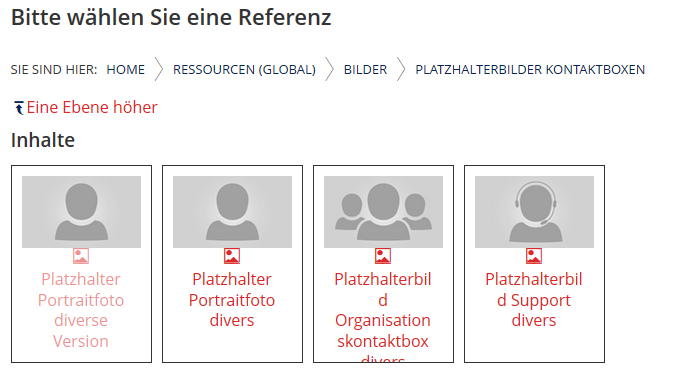
If you decide not to publish a portrait, you can select a placeholder to include in the contact box. There are a number of (gender-neutral) versions available. There are placeholder images for personal contact boxes as well as for organization contact boxes and another for support contacts. These can be found in the image folder of the global resource folder under “placeholder images for contact boxes.”