
Multilingual content maintenance
Table of contents

To simplify the creation and maintenance of multilingual content on the TU Dresden website, the WebCMS offers an intuitive editing interface and integration of the translation service DeepL.
Switching languages during editing
How you switch languages depends on the content element and your screen size: Either directly in the input field or - for text-heavy content types1 - you switch between languages either at the right-hand edge of the editing interface or the two languages are displayed side-by-side for comparison (depending on screen size/resolution).
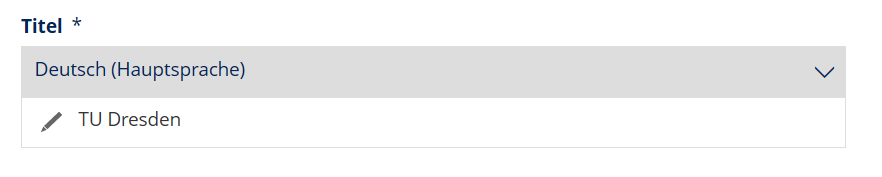
Language switch directly in the input field
All texts and text fields are always displayed in the currently selected language. Languages for which no translation has yet been entered can be recognized by the crossed-out eye symbol ("Translation not yet started") in the text-heavy content types1.
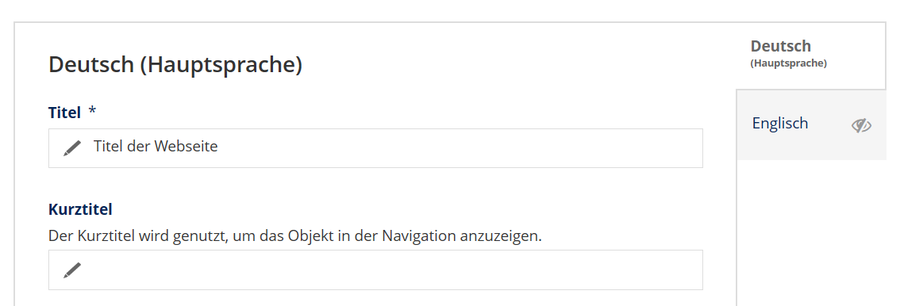
New interface with smaller display size: Switching the language for all fields simultaneously
If two languages are shown next to each other on larger display sizes, there is no need to switch between them on the right-hand side. Instead, the language versions can be edited in parallel2. The main language (usually German) is displayed on the left-hand side and the selected second language (usually English) on the right-hand side. If more than two languages are activated, you can switch the displayed language on the right-hand side as required.
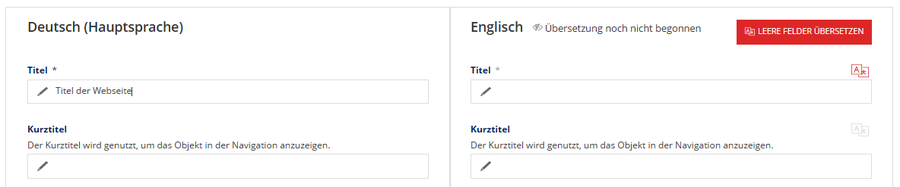
With sufficient screen size: Display side-by-side for parallel editing of the language versions
Please note:
As soon as you fill in at least one field of another language, all mandatory fields of this language must be filled in. You can only avoid this by canceling the processing.
Translation with DeepL
With the online translation tool DeepL, texts are automatically translated by artificial intelligence (AI). DeepL has been integrated into the editorial interface of the WebCMS and is available to you for maintaining English content.
Note: This only provides you with the option of translating within the TUD website. It is not a license for use on your local computer.
Creating a new translation
If your website has not yet been translated ("Translation not yet started") or only partially translated, you can use DeepL to add translations from German into English in two ways:

- Translate all empty fields: Select the "Translate empty fields" button. A translation from DeepL is now automatically added to the empty English fields for all existing content in German. If a translation has been entered for all fields, the button is displayed as inactive (gray).
- Translate individual fields: Select the "Translate this field with DeepL" pictogram button on the respective input field. The button is active (red color) if there is content in German. Otherwise, the function is not available (button grayed out).

Translation of individual fields with the red pictogram button
You have the option to adjust the translation added by DeepL at any time. At this point, we expressly recommend that you always check the automatic translation to ensure that it makes sense and is correct. Despite all system intelligence, inappropriate translations may occur. If in doubt, ask the Translation Office for advice.
The fields translated by DeepL receive a temporary "Translated with DeepL" message in the editing system. This only appears during the first edit; after saving and re-editing, the note is no longer visible.
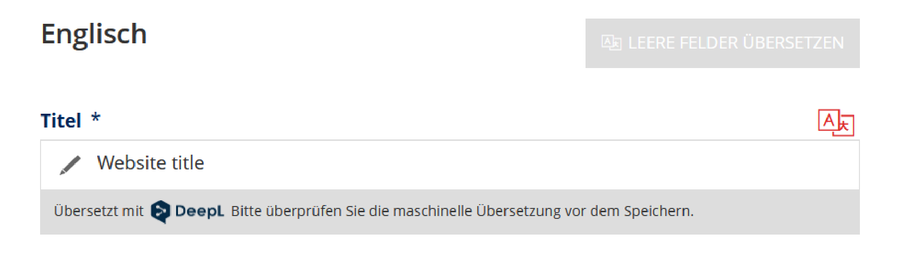
Temporary note on the DeepL translation
Select "Save" when you are finished with the translation.
Edit translation
When editing existing content, after selecting the pictogram button, the previous translation and the translation suggested by DeepL are displayed next to each other for comparison. In this mode, it is also possible to copy content back and forth (e.g. if only individual passages are to be copied into the existing text). By selecting "Select this translation" below the input fields, you can mark your favorite translation and accept it with the "Accept selected translation" button. The transferred translation is temporarily marked with the note "Translated with DeepL" and can be edited further at this point if required.
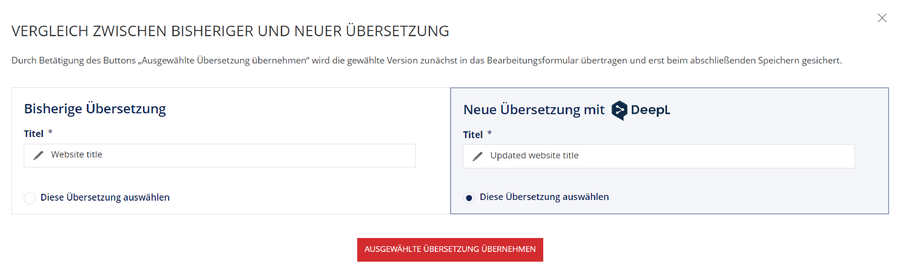
Comparison of the previous translation and the translation proposed by DeepL with selection option.
Select "Save" when you are finished with the translation.
FAQ on the use of DeepL
No, an automated translation of texts only takes place in WebCMS through your active request of a DeepL translation for all or selected fields during the editing of your content. This also applies after the revision of German texts for which an English translation was already available. Without a new request to DeepL, the English translations will remain in the previous version.
Yes, please always check that the automatically translated content makes sense in the respective context. While the quality of AI translations has improved in recent years, inappropriate translations may still occur. If in doubt, ask the Translation Office for advice.
Yes, a glossary with centrally defined TUD-specific terms is taken into account when translating with DeepL. This includes in particular the translations for the uniform use of English-language terms in the international external presentation. You can find out more in the glossary on the TUD intranet.
DeepL is available in WebCMS for the translation of German content into English.
The principles of the GDPR on compliance with data protection regulations also apply to texts on websites. The use of DeepL for the translation of content intended for publication on the TUD website has been agreed and approved by the Data Protection Officer.
As a general rule, however, personal and sensitive data should be avoided in translation requests. If you delete the data from your text beforehand and use placeholders, you will be on the safe side.
The online translation service DeepL is available free of charge to employees for translations in the context of editorial work on the TUD websites (and only for this purpose). The service is used via a technical interface through which translation requests are transmitted character by character. The number of characters is the basis for calculating the costs. The TUD has purchased a certain number of characters as an (annual) flat rate. Monitoring is used to track whether this number of characters is sufficient or whether it is exceeded. The costs are financed centrally (via Department 7.5 Web and Video); the costs are not passed on.
No, there is no campus license for the use of DeepL for TUD employees.
The connection of DeepL to the WebCMS is made via a technical API interface, which is intended exclusively for the integrated translation of TUD website texts. It does not include individual licenses for the employees' workstations. A licensing model for a larger number of user licenses is the subject of the CDIO and has been submitted to it for a decision.
Do you have questions or a problem using DeepL? The web support team will be happy to help you.
 © Sven Ellger/TUD
Visiting address:
Standort Nöthnitzer Straße, 4. OG, Raum 462 Nöthnitzer Straße 69
01187 Dresden
Postal address:
TUD Dresden University of Technology
Directorate Strategy and Communication,
Unit Web and Video
01062 Dresden
Office hours by phone:
- Monday to Friday:
- 10:00 - 12:00
- 13:00 - 15:00
Using a working copy is useful if you are creating a new translation for an already published page. You can use it to gradually revise a page without having to publish every change immediately.
Footnotes
-
Parallel editing of languages is currently only available for content pages, news articles, FAQ and information boxes, as these are the most common page and box types on the TU Dresden website and also form the main focus of multilingual content. We will gradually extend this editing method to other content and box types for which only field-by-field language switching is currently offered.
-
If the screen size is too small, the same effect can be achieved by zooming out in the browser (key combination [Ctrl] + [-] or switch off zoom with [Ctrl] + [0]).