
IN:TACT – Inclusive Communication in the Classroom
IN:TACT – Inclusive Technologies and Adaptive Communication in Teaching
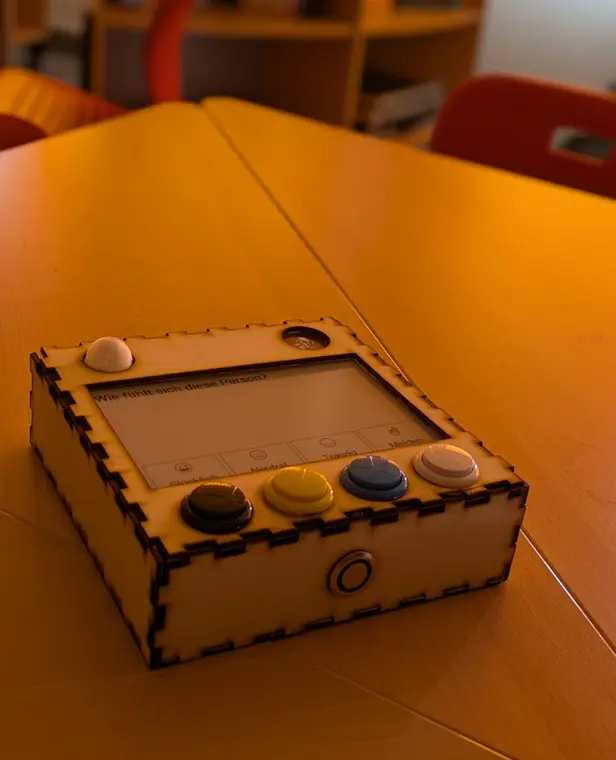
Prototyp des In:Tact
Digital Technologies for Inclusive Communication and Participation in the Classroom
How can teachers address the individual needs of all students without disrupting the flow of the lesson? And how can students participate in class if they have difficulty with verbal communication or raising their hands the traditional way?
These questions are at the heart of the IN:TACT (Inclusive Technologies and Adaptive Communication in Teaching) research and development project. The goal is to develop and study an interactive communication system that provides students with alternative—particularly nonverbal—ways to participate in class.
Especially in inclusive learning groups, diverse communication needs and individual challenges can pose a difficulty. While some students have difficulty expressing themselves verbally or drawing attention to themselves by raising their hands, others need a low-barrier way to communicate when they feel overwhelmed, need support, or want to share their current progress.
This is where IN:TACT comes in: Using interactive communication devices, students can provide individual feedback that is made available to teachers digitally in real time. The goal is to reduce communication barriers, strengthen students’ self-determination, and support teachers in designing lessons tailored to students’ needs.
IN:TACT in the Classroom—An Application Scenario
A teacher assigns a task to their class during a geography lesson. Using their digital teacher app, they send the task to the students’ communication devices. In addition to the task, four response options appear on the displays: “Done,” “I have a question,” “I need more time,” and “It’s too loud.”
While the class is working, a student realizes they need more time. Instead of interrupting their work and raising their hand, they press the corresponding button on their device. The teacher receives the feedback immediately on her tablet and can respond accordingly.
Another student has already completed their task. They also signal this by pressing a button and are then given an additional task.
At the end of the lesson, the teacher wants to find out which tasks were particularly difficult. She launches a short survey that all students can complete via their devices. The results are summarized in real time and can be discussed as a group.
This scenario illustrates how IN:TACT can facilitate continuous communication between teachers and students without requiring immediate verbal interaction for every piece of feedback. At the same time, students are given additional opportunities to participate in class.
Technical Structure—The Three Components of IN:TACT
The communication system consists of three interconnected components that together enable flexible, accessible communication in the classroom.
1. Student Device – Communication Through Simple Interaction
Physical buttons, an e-paper display, and a text-to-speech function enable low-barrier interaction with the system. The specially developed communication device serves as the interface for students. Using four physical buttons, students can provide feedback, ask questions, or draw attention to their individual needs. An e-paper display shows assignments and the corresponding button functions. Additional features, such as a text-to-speech function and visual feedback, open up further avenues of access. Teachers can adapt the button functions to suit the specific classroom situation. This allows the device to be used for individual feedback as well as for assignments and surveys.
2. Server – the central communication interface
The server connects students’ devices to teachers’ applications and coordinates the exchange of information. For example, the server application transmits tasks and surveys to selected devices and forwards students’ responses to the teachers’ applications. In addition, it manages the assignment of logged-in devices and enables the simultaneous use of different end devices. The central communication architecture thus forms the technical foundation for flexible use of the system.
3. Teacher Application – Collecting Feedback and Designing Lessons
The teacher application enables teachers to organize communication with students and respond to their feedback. Teachers can create assignments and surveys, send them to individual students or the entire class, and view incoming responses in real time. Survey results can be presented graphically and used to further shape lesson planning. The application is not limited to a specific type of device. In addition to use on laptops, tablets, and smartphones, other interaction options—such as via smartwatches or AR glasses—are also being considered as potential extensions. This would allow teachers to receive important feedback even while moving around the classroom in the future.
Research and Further Development
IN:TACT builds on developments within the “Teaching and Learning Space for Inclusion” project, which have been underway since 2023 in cooperation with the Chair of Human-Computer Interaction at TU Dresden. The existing prototypes are being further developed from both technical and pedagogical perspectives and are undergoing scientific evaluation. Of particular interest are the usability of the various components, their potential for promoting inclusive teaching processes, and the possibilities for accommodating different communication needs. In addition to its application in schools, the project will also explore the extent to which the system can be adapted for use in higher education. Here, alternative communication channels could likewise help facilitate student participation and create inclusion-sensitive teaching and learning environments. In the long term, IN:TACT aims to help harness digital technologies not only as tools for knowledge transfer but also as means to promote communication, self-determination, and equal participation.