
Oct 07, 2026
Redefining Teaching: The Lightboard Studio at TUD
Report by Thomas Wolf, SG 8.7
Previous Planning Status of the MS1 Building
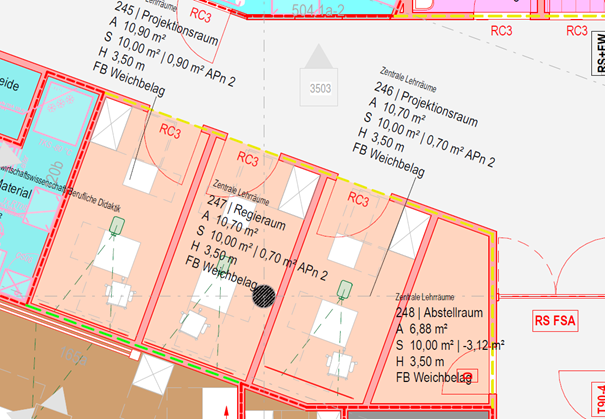
When it was decided at the start of the planning process that the Faculty of Education would move from Weberplatz to the new building on Münchener Straße, the so-called “space allocation plan” from Weberplatz was transferred to MS1. The Victor-Klemperer Hall at Weberplatz, with its two projection rooms and a control room, was also incorporated into the building plans. However, there was no room in the building for the actual lecture hall. What remained were the two projection rooms and a control room—without an accompanying lecture hall.
At the height of the COVID-19 pandemic, the media technology specialist then thought it would be a good idea to convert these rooms—which were unusable in their current form—into dedicated video conference rooms. These would include interactive touchscreens, ceiling-mounted microphones, a full-featured media control system, transmission lines, and everything else typically installed in large seminar rooms and lecture halls—at a cost of a good €40,000 per room. Following intervention by the MLLR department, the equipment plan was scrapped, and the four small rooms were subdivided—in consultation with the architect—into two roughly square rooms that are now usable.
Video Studio in the POT
The first dedicated “one-button studio” for independent video productions was created in the Potthoff Building after a former data distribution room there was dismantled. The idea to implement such a studio had been around for some time, after the University of Cologne presented its studios and provided information about them during a conference (https://www.hf.uni-koeln.de/40040). Based on this concept and adapted to the TUD, we built a studio in the room using the simplest possible means. Since then, it has been used regularly by several faculty members. However, minor technical glitches continue to cause headaches for both the faculty and us. Problems occur particularly frequently after updates to the small Mac computer, which serves as the studio’s central unit. Based on these experiences, we wanted to further develop the studios in MS1.
Contact with ZiLL in Connection with the Experimental Lab
During this phase of further development, we established contact with ZiLL regarding the experimental lab. The question arose as to whether one of the central classrooms could be repurposed as an experimental lab and, as part of that, whether the Lightboard—which at the time was located relatively far from the main campus, in a room in the Strehlener Straße office building—could also be utilized. Since space requirements at the MS1 site and the Faculty of Electrical Engineering were very high, the experimental lab itself could not be implemented at that location; however, the idea of bringing the Lightboard closer to the main campus was to be pursued further.
After evaluating the Lightboard’s existing technology and the underlying concept developed by the manufacturer, and following a Zoom meeting with one of the manufacturer’s technicians, the concept was slightly adapted to the on-site conditions and thus implemented in the now-available studio and the adjacent video studio.
Implementation and Use
The concept, which has been implemented in both studios in MS1, is based on a self-contained, standalone solution. Efforts were made to keep the level of automation as high as possible to ensure ease of use. Users simply need to turn on the power using the foot switch and turn off the room lights. After that, recording can be started fully automatically by pressing a single button on their own USB flash drive. Individual—though not strictly necessary—adjustments can be made using the small control panel provided. The possible uses are limited to the bare essentials, but still allow for a pleasant degree of variety within those parameters. Presentations can be given while sitting or standing; camera angles can be adjusted, and users can incorporate their own presentations. Various image compositions combining the presentation and the camera feed can be selected, and professional audio equipment ensures consistently high-quality sound. In addition, it is possible to conduct video conferences or, for example, live webinars from both rooms, as the available media (camera/microphones) can be connected to your own laptop via USB.
Write, sketch, and explain complex concepts step by step while remaining facing the students: Lightboard videos open up a wide range of possibilities for creating engaging learning content. The new Lightboard Studio is now located on the main campus in MS1 and is available for the production of interactive teaching and learning videos. You can see the Lightboard Studio in action in the video below.
© TUD